
Eight bands
Select a band on the graph to edit it. Each band has its own frequency and filter shape, with gain and Q controls where the selected shape uses them.
Free trial available
Find the frequency. Shape the curve. Eight independent bands give you room for a broad tonal move, a focused cut or both, with the sound’s spectrum in view.
€6.99one-time
Try free for 30 daysOr get all eighteen plugins with Spark Complete for €27.99. Your free trial starts on activation. No card, no automatic charge.
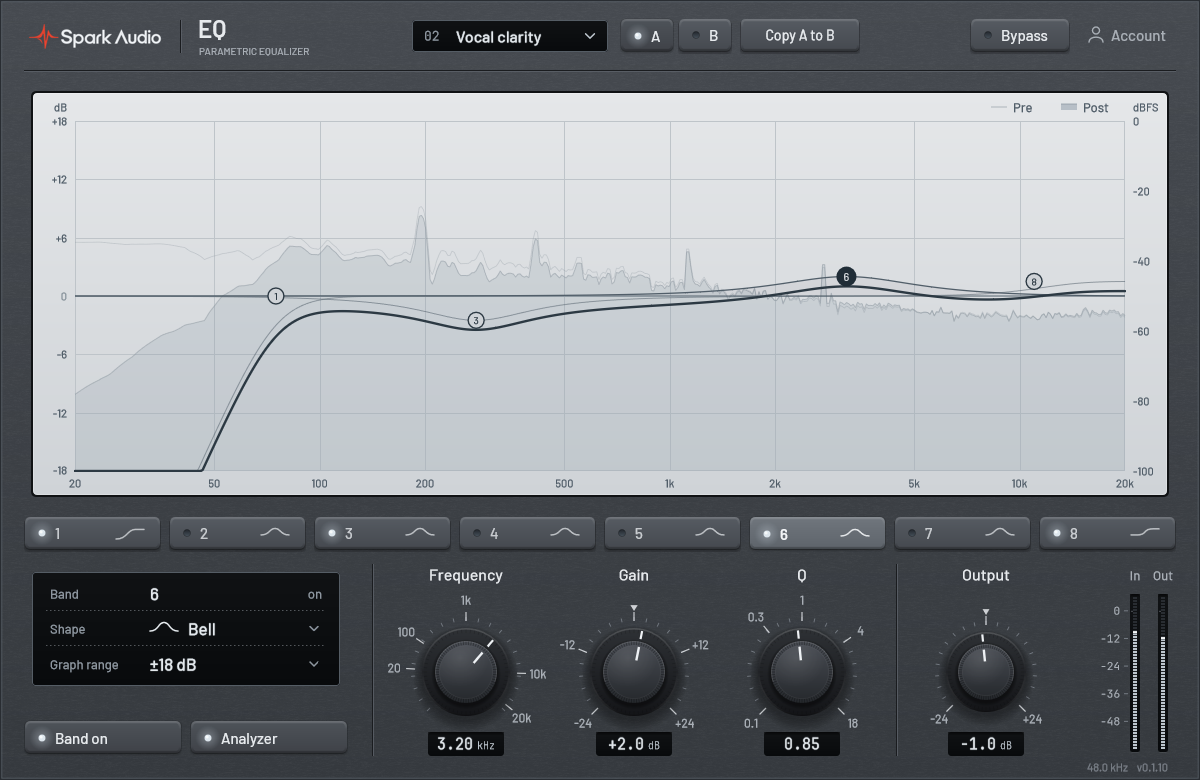
Work on the frequency graph, then refine the selected band with exact frequency, gain and Q values. Every band has its own filter shape and bypass.
Choose a low cut to reduce rumble, then set its frequency and slope to leave the useful body of the recording intact.
12 to 48 dB per octave
Four cut slopes let you choose between a gentle roll-off and a steeper boundary.
Use a broad bell to reshape the mids or a narrower cut to reduce a resonance. Drag the band into place and type a value when you need precision.
Frequency, gain and Q
Adjust the center frequency, amount and bandwidth independently, then compare in the full mix.
Use low and high shelves for wider changes in weight and brightness. Watch the input and output spectra together to see how your curve changes the balance.
Compare at the same level
Trim Output after a boost and use bypass to judge the tonal change without a louder signal winning by default.
The response graph takes the center of the interface. The selected band’s controls stay close at hand.
Select a band on the graph to edit it. Each band has its own frequency and filter shape, with gain and Q controls where the selected shape uses them.
Choose Bell, Low Shelf, High Shelf, Low Cut, High Cut, Notch or Band Pass for each band. Combine broad shaping with focused filtering in one instance.
Low Cut and High Cut offer 12, 24, 36 and 48 dB per octave. Set the cutoff first, then choose the slope that suits the surrounding sound.
Input and output spectrum traces show the energy across the frequency range alongside the EQ response. Use them to orient a move, then listen to the result.
Start from a prepared curve for common sources, then adjust it to your recording. The graph shows every band so the preset is easy to understand and change.
Set the final output level and compare the full EQ with bypass. Individual band bypass lets you check one adjustment at a time.
Try Spark EQ free for 30 days. No card required.
Download for Windows